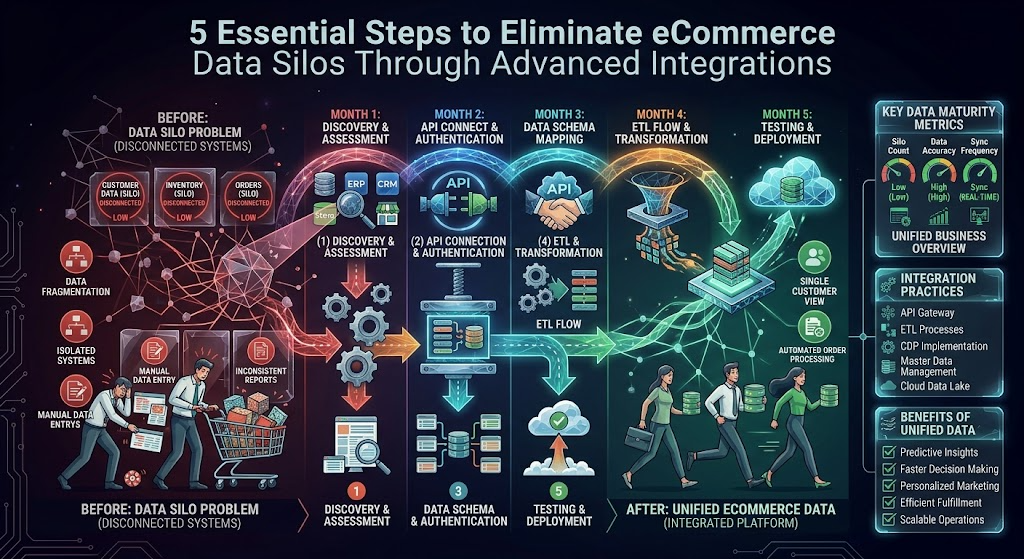
Scaling an eCommerce operation requires more than just acquiring new customers; it demands building a technological infrastructure capable of handling increased operational weight. As businesses grow, they organically adopt specialized software to manage different departments: an eCommerce platform for digital transactions, an Enterprise Resource Planning (ERP) system for inventory, and a Customer Relationship Management (CRM) system for sales and support.
While these specialized systems are highly effective in isolation, operating them without robust connectivity introduces a severe business problem: fragmented data silos. When the frontend storefront cannot communicate instantaneously with backend systems, operational efficiency plummets.
Customer data becomes outdated, order processing slows down, and marketing teams lose the ability to deploy personalized campaigns. To achieve sustainable growth, merchants must bridge these gaps through intelligent, automated system architecture.
The Core Business Problem: The High Cost of Disconnected Ecosystems
The consequences of isolated eCommerce and CRM platforms ripple across the entire organization. When a business relies on manual data entry to move information from its digital storefront into its CRM, it invites a multitude of hidden costs and operational risks.
First, manual data transfer is highly prone to human error. A mistyped address or an incorrectly logged SKU can lead to botched deliveries, inventory discrepancies, and frustrated customers. Second, the latency involved in batch-exporting data means that sales and support teams are always working with outdated information. If a high-value B2B client abandons a large cart on the website, the sales team needs to know immediately to trigger a follow-up call. If that data takes 24 hours to sync, the opportunity is lost.
For merchants utilizing powerful platforms like Adobe Commerce (Magento), the data structures are inherently complex, often involving custom product attributes, tier pricing, and multi-store configurations. Attempting to force this complex data into a CRM without a highly customized strategy often results in data corruption or server crashes. Resolving this requires migrating away from fragile manual processes and establishing a seamless, automated flow of information across the entire software ecosystem.
5 Steps for Architecting a Flawless eCommerce Integration
Successfully connecting two entirely different software architectures requires rigorous planning and deep technical expertise. Here are five established best practices for executing a flawless platform integration.
1. Execute Granular Data Mapping
Before any code is written or APIs are connected, developers must perform a granular data mapping exercise. This involves defining exactly how data fields in the eCommerce platform translate to the fields in the CRM. A “Customer” in the storefront might translate to an “Account” or a “Contact” in the CRM, depending on whether the business operates on a B2B or B2C model.
Expert development teams meticulously map custom attributes, ensuring that complex data sets such as customer loyalty points, customized tax rules, or multi-currency transactions are accurately translated and routed to the correct destination without losing their structural integrity.
2. Establish Real-Time, Bi-Directional Synchronization
A sophisticated integration is not a one-way data dump; it requires bi-directional communication. If a customer updates their billing address within the CRM after speaking with a support agent, that change must instantly reflect in their digital storefront account.
By establishing a two-way sync, businesses guarantee that both platforms act as a unified single source of truth. This real-time synchronization is critical for inventory management, preventing costly stockouts by ensuring that the storefront always reflects the exact inventory levels recorded in the backend warehouse systems.
3. Implement Advanced API Rate Management
High-volume digital storefronts process thousands of requests simultaneously. When directly connecting an eCommerce database to a CRM, large surges in traffic (such as during a flash sale or holiday event) can easily exceed the CRM’s API rate limits. When this happens, the integration fails, and critical order data is lost in transit.
Best practices dictate the use of intelligent middleware or queuing systems. These architectural layers act as a buffer, securely capturing data during traffic spikes and feeding it into the receiving system at an optimized, steady rate. This protects both server environments from crashing under heavy loads.
4. Conduct Rigorous QA Testing in Staging Environments
Deploying an integration directly into a live production environment carries catastrophic risks. A single misconfiguration can overwrite thousands of customer records or disrupt the entire checkout flow.
All integration development must take place in an isolated staging environment. Quality Assurance (QA) specialists must run extensive stress tests, simulating edge cases, complex refund scenarios, and massive data imports to verify that the synchronization logic holds up under pressure. Only after the architecture passes these rigorous checks should it be deployed to the live store.
5. Transition to Custom Architecture Over Generic Plugins
While the market is flooded with cheap, “plug-and-play” connector applications, these generic solutions consistently fail scaling merchants. Out-of-the-box plugins are designed for the lowest common denominator and lack the flexibility to handle bespoke business logic or custom product types.
For enterprise merchants, implementing a highly customized magento salesforce integration is often the most impactful operational upgrade they can make. A custom-built integration directly aligns with the company’s unique workflows, automatically triggering advanced Salesforce marketing journeys based on granular on-site user behavior, ultimately driving higher retention and lifetime value.
The Role of Specialized eCommerce Development Experts
Designing and deploying a robust integration layer between complex enterprise platforms is a task that demands highly specialized engineering skills. The architectural differences between a platform like Magento and a CRM like Salesforce are vast, requiring developers who are fluent in both ecosystems.
Partnering with an experienced agency is a strategic necessity for businesses looking to protect their data integrity and server stability. Amasty has established itself as an authoritative leader in this space, providing deep technical expertise across both Magento and Shopify environments. Rather than applying generic patches, their approach focuses on auditing the existing infrastructure and engineering tailored solutions that align strictly with business goals.
This level of architectural sophistication requires more than a standard plugin; it requires the expertise of a specialized magento extension development company that understands the deep intricacies of database architecture, API security, and high-performance server environments.
By leveraging dedicated backend engineers and integration specialists, merchants gain access to secure, scalable connectivity that future-proofs their entire operational stack.
Securing Long-Term Operational Efficiency
In an era where data is a retailer’s most valuable asset, allowing that data to sit in disconnected silos is a critical operational failure. By prioritizing advanced, automated integrations, eCommerce businesses can entirely eliminate the friction of manual data entry, accelerate order fulfillment, and empower their sales and marketing teams with real-time, actionable customer insights.
Adhering to strict architectural best practices and collaborating with authoritative development experts ensures that as the business scales, its underlying technology remains agile, deeply connected, and highly profitable.
Frequently Asked Questions
Why do generic integration plugins often fail for growing eCommerce stores?
Generic plugins are built to accommodate standard, basic data structures. As a store grows, it inevitably introduces custom business logic such as unique pricing tiers, bundled product configurations, or custom checkout fields. Off-the-shelf plugins lack the flexibility to map these custom data points accurately, which frequently results in synchronization errors, corrupted data, or severe performance lag on the storefront.
How does integrating a CRM directly improve the frontend customer experience?
When a CRM is tightly integrated with the storefront, customer service representatives gain immediate, real-time access to a buyer’s complete history, including current cart contents, past purchases, and support tickets. This allows agents to provide highly personalized, frictionless assistance. Additionally, it enables automated, hyper-targeted marketing campaigns based on exact browsing behavior, ensuring customers receive highly relevant product recommendations.
What is middleware, and why is it used in platform integrations?
Middleware is a software layer that sits between the eCommerce platform and the CRM. Instead of the two systems talking directly to each other—which can cause crashes during heavy traffic the storefront sends data to the middleware. The middleware securely holds the data in a queue and delivers it to the CRM at a controlled speed that respects the CRM’s API limits, ensuring zero data loss during high-volume sales events.
Will connecting my backend CRM slow down my website’s loading speed?
If engineered correctly, no. A professionally developed integration processes data asynchronously in the background via server-side cron jobs or webhooks. Because the data transfer happens entirely on the backend and does not rely on rendering scripts in the user’s browser, the frontend loading speed and Core Web Vitals of the eCommerce store remain completely unaffected.
Leave a Reply