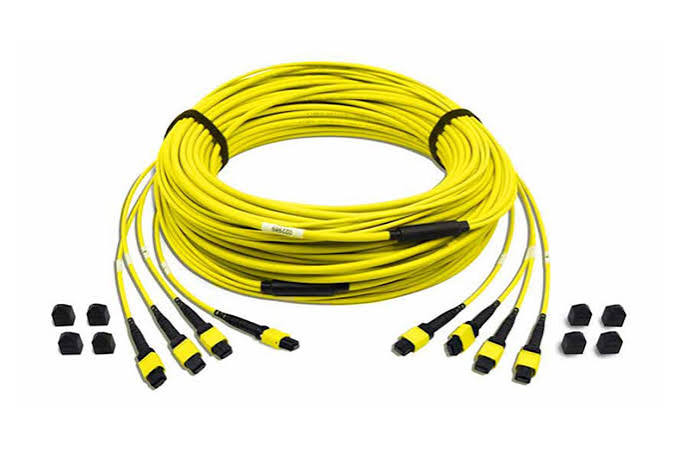
A well-manufactured mpo trunk cable can still underperform badly if it’s installed or tested incorrectly — and because these cables carry so many fibers through a single connector interface, small handling mistakes tend to have an outsized effect on network performance. Whether you’re managing the installation directly or overseeing a contractor doing the work, knowing what good practice actually looks like helps catch problems before they turn into an unreliable network.
Handling MPO Trunk Cable Before Installation
Protecting the Connector Ends
MPO connectors are more sensitive to contamination than many installers expect, since dust or oil on the fiber end-face affects every fiber behind that single connector at once, not just one strand. Dust caps should stay on until the moment of connection, and connectors should never be set down on an unprotected surface during installation.
Respecting Bend Radius
Fiber cables have a minimum bend radius for a reason — exceeding it, even temporarily during installation, can cause micro-fractures that degrade signal quality without any obvious external damage. This matters especially with trunk cables routed through tight conduit runs or around sharp corners in cable trays, where installers under time pressure sometimes force a cable into a tighter bend than it should tolerate.
Cable Pulling Technique
For longer trunk cable runs, pulling tension needs to stay within the cable’s rated limits, and pulling should be done steadily rather than in sharp jerks that spike tension momentarily. Using proper pulling grips rather than pulling directly on the connector or jacket significantly reduces the risk of internal fiber damage that won’t show up until testing.
Cleaning: The Step Installers Skip Too Often
Cleaning MPO connectors before every mating is one of the simplest steps in the entire installation process, and also one of the most commonly skipped under time pressure. A proper cleaning routine typically involves inspecting the end-face under magnification, using a dedicated MPO cleaning tool rather than a standard single-fiber cleaner, and re-inspecting after cleaning to confirm the end-face is actually clear before connecting. Skipping this step is one of the leading causes of high insertion loss on newly installed links that otherwise test as installed correctly.
Testing an MPO Trunk Cable Properly
Insertion Loss and Return Loss
These two measurements form the baseline for verifying a trunk cable’s performance. Insertion loss measures how much signal strength is lost as light passes through the connection, while return loss measures how much light reflects backward rather than continuing forward — both need to fall within acceptable thresholds for the network’s intended speed and distance.
Testing Every Fiber, Not Just a Sample
Because an MPO connector carries multiple fibers at once, it’s tempting to test a handful and assume the rest perform similarly. This is a mistake — a single damaged or poorly polished fiber within an otherwise good connector can create an intermittent fault that’s much harder to diagnose after the fact than it would have been to catch during initial testing.
Using the Right Test Equipment
Standard single-fiber test equipment isn’t designed for MPO connectors, and using improvised testing methods often produces unreliable results. Purpose-built MPO test equipment, including adapters designed specifically for multi-fiber connectors, gives accurate readings across every fiber in the connector rather than an approximation.
Documenting Results Per Link
Keeping a clear record of test results for every trunk cable link — not just a pass/fail summary — makes troubleshooting far easier if a problem surfaces months later, since it’s possible to compare current readings against the original installation baseline rather than starting diagnosis from scratch.
Common Installation Mistakes and How to Avoid Them
Skipping end-face inspection. Assuming a connector is clean without actually checking under magnification leads to avoidable contamination-related faults.
Ignoring polarity verification during testing. A trunk cable can test fine for raw signal loss while still being wired with incorrect polarity, which won’t show up unless polarity is specifically verified as part of the test process.
Overtightening or mishandling connector latches. MPO connectors use a push-pull latching mechanism that doesn’t require force — rough handling here is a common cause of premature connector wear.
Rushing cable labeling. Trunk cables that aren’t clearly labeled at both ends during installation create confusion during future troubleshooting or expansion, especially in racks with dozens of similar-looking cables.
Environmental Considerations During Installation
Temperature and humidity at the time of installation can affect both handling and testing accuracy, particularly for outdoor or unconditioned spaces. Where possible, allowing cable to acclimate to the installation environment before final termination and testing helps avoid measurement inconsistencies caused by temperature-related expansion or contraction.
Building a Repeatable Installation Process
The installations that go smoothly tend to follow a consistent checklist rather than relying on individual installer experience alone: inspect and clean every connector before mating, respect bend radius and pulling tension throughout the run, test every fiber with proper MPO-rated equipment, verify polarity as part of testing rather than assuming it, and document results clearly for future reference. Standardizing this process across a team reduces the variability that often explains why some installations perform flawlessly while others need repeated troubleshooting visits.
Final Thoughts
The performance of an MPO trunk cable depends as much on installation and testing discipline as it does on the cable’s manufacturing quality. Careful handling, proper cleaning, thorough per-fiber testing, and clear documentation turn a good cable into a reliable network link — while skipping any of these steps tends to surface as mysterious, hard-to-diagnose problems long after the installation crew has moved on to the next job.
Leave a Reply