Selling online has never been easier, but managing orders, shipping packages, and keeping customers happy can quickly become overwhelming. As businesses grow, handling hundreds or even thousands of orders manually becomes a challenge. This is where the combination of Auctane, ShipStation, and Amazon creates a powerful solution for sellers looking to simplify their operations.
Whether you’re a small business owner launching your first products or a growing brand expanding across multiple marketplaces, understanding how ShipStation works with Amazon can help save time, reduce errors, and improve customer experiences.
In this comprehensive guide, we’ll explore how this shipping platform supports Amazon sellers, its key features, benefits, setup process, best practices, and future trends shaping e-commerce logistics.
Understanding Auctane and ShipStation
Before diving into Amazon integration, it’s important to understand the relationship between Auctane and ShipStation.
Auctane is a technology company specializing in shipping and logistics solutions for online businesses. The company owns several well-known shipping platforms designed to help merchants manage fulfillment more efficiently.
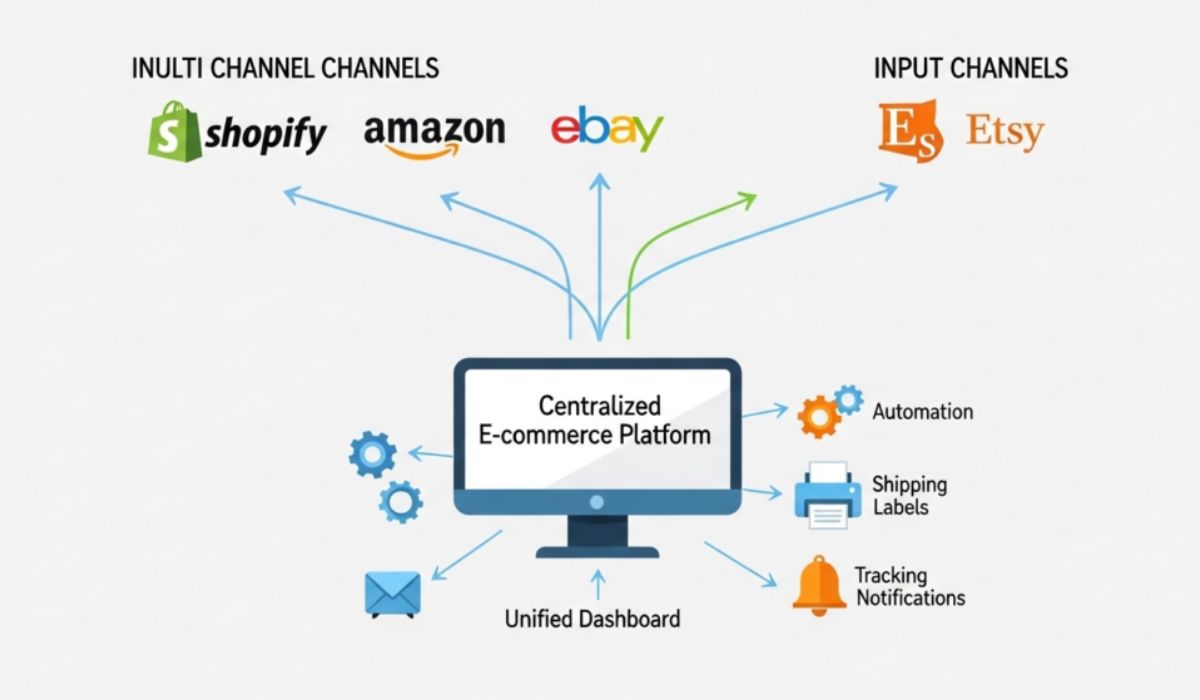
ShipStation is one of Auctane’s flagship products. It is a cloud-based shipping software that connects online stores, marketplaces, carriers, and fulfillment services into a single dashboard.
Think of it as the control tower at an airport. Instead of managing every flight separately, the tower coordinates everything from one place. Similarly, ShipStation allows sellers to manage orders from multiple channels without switching between different systems.
Why Amazon Sellers Need Shipping Automation
Amazon is one of the world’s largest online marketplaces, attracting millions of customers every day. While this provides tremendous opportunities, it also creates operational challenges.
Growing Order Volume
As sales increase, manually processing orders becomes time-consuming and inefficient.
Customer Expectations
Modern shoppers expect fast delivery, real-time tracking, and reliable service.
Competitive Environment
Amazon’s marketplace is highly competitive. Efficient fulfillment can directly impact seller ratings and customer satisfaction.
Operational Complexity
Managing inventory, tracking shipments, and updating order statuses manually often leads to mistakes.
Shipping automation addresses these issues by reducing repetitive tasks and ensuring smooth order fulfillment.
How ShipStation Integrates with Amazon
One of ShipStation’s most valuable features is its seamless integration with Amazon.
Once connected, the platform automatically imports orders from Amazon Seller Central. Sellers can then process, organize, and ship these orders without manually entering customer information.
The integration synchronizes essential details, including:
- Customer information
- Shipping addresses
- Order status
- Tracking numbers
- Shipment updates
When a shipment is created, tracking information is automatically sent back to Amazon, helping sellers maintain compliance with marketplace requirements.
This synchronization minimizes manual work and improves accuracy across the fulfillment process.
Key Features Amazon Sellers Can Use
Automated Order Import
ShipStation continuously imports new Amazon orders into its dashboard. This eliminates the need to check Amazon repeatedly for incoming purchases.
Batch Processing
Rather than creating shipping labels individually, sellers can process multiple orders simultaneously.
For businesses shipping dozens or hundreds of packages daily, batch processing can dramatically reduce fulfillment time.
Shipping Label Creation
Users can generate labels directly from the platform using integrated carrier services.
The system automatically calculates shipping options based on package details and destination information.
Tracking Updates
Shipment tracking is automatically shared with Amazon customers.
This improves transparency and reduces customer inquiries regarding package status.
Order Filtering
ShipStation allows sellers to create custom filters for organizing orders based on criteria such as:
- Product type
- Shipping method
- Destination
- Order value
- Priority level
These filters make order management more efficient and easier to scale.
Benefits of Using ShipStation for Amazon Fulfillment
Improved Efficiency
Automation reduces repetitive tasks, allowing teams to focus on growth-oriented activities.
Instead of spending hours entering shipping information, sellers can process orders within minutes.
Fewer Human Errors
Manual data entry often leads to mistakes such as incorrect addresses or tracking information.
Automation significantly lowers the risk of these costly errors.
Better Customer Experience
Fast shipping and accurate tracking contribute to positive customer reviews and stronger brand reputation.
Happy customers are more likely to become repeat buyers.
Scalability
As order volume grows, businesses need systems capable of handling increased demand.
ShipStation enables sellers to scale operations without proportionally increasing administrative workload.
Cost Savings
Shipping software often helps businesses identify more cost-effective carrier options and optimize shipping workflows.
Over time, these savings can have a significant impact on profitability.
Setting Up Amazon with ShipStation
Connecting Amazon to ShipStation is generally straightforward.
Step 1: Create a ShipStation Account
Begin by registering for a ShipStation subscription that fits your business requirements.
Step 2: Connect Amazon Marketplace
Navigate to the marketplace integration section and select Amazon.
Step 3: Authorize Access
Grant ShipStation permission to access your Amazon seller account.
Step 4: Import Orders
Once connected, ShipStation begins importing order data automatically.
Step 5: Configure Shipping Preferences
Set preferred carriers, package types, automation rules, and notification settings.
Step 6: Test the Workflow
Process a few orders to verify that synchronization and tracking updates work correctly.
After setup, most daily fulfillment tasks can be managed from a single dashboard.
Automation Rules That Save Time
One of the most powerful capabilities within ShipStation is workflow automation.
Automation rules allow the software to perform actions automatically based on predefined conditions.
Examples include:
Assigning Shipping Services
Orders meeting certain criteria can automatically receive a specific shipping method.
Tagging Orders
Products or customer categories can be tagged for easier organization.
Applying Insurance
High-value shipments can automatically receive shipping insurance.
Selecting Package Types
Specific products can be matched with predefined packaging configurations.
These automated workflows help eliminate repetitive decision-making and ensure consistency.
Multi-Channel Selling and Amazon Integration
Many sellers do not rely solely on Amazon.
They may also sell through:
- Independent websites
- Online marketplaces
- Social commerce platforms
- Wholesale channels
ShipStation centralizes orders from multiple sales channels into one interface.
This unified approach offers several advantages:
Centralized Management
Orders from different platforms appear in one dashboard.
Consistent Shipping Processes
The same fulfillment workflows can be applied across all channels.
Improved Visibility
Businesses gain a comprehensive view of shipping operations.
Simplified Reporting
Performance metrics become easier to analyze and compare.
For growing brands, centralized management is often essential for long-term success.
Common Challenges and How ShipStation Helps
High Order Volumes
Large sales events can overwhelm manual fulfillment systems.
ShipStation handles increased order loads efficiently through batch processing and automation.
Shipping Delays
Delayed shipments can negatively impact customer satisfaction.
The platform provides visibility into order status and shipping progress, helping businesses respond quickly.
Inventory Coordination
Although inventory management may require additional tools, integrated workflows improve coordination between sales and fulfillment activities.
Carrier Management
Working with multiple carriers can become complicated.
ShipStation consolidates carrier relationships within a single platform, simplifying label generation and tracking.
Best Practices for Amazon Sellers Using ShipStation
To maximize results, sellers should follow several proven strategies.
Create Smart Automation Rules
Invest time in designing workflows that align with your business model.
Monitor Shipping Performance
Regularly review shipping metrics and delivery times.
Keep Customer Communication Active
Use automated notifications to keep buyers informed about shipment progress.
Review Carrier Costs
Shipping rates change frequently. Comparing options helps control expenses.
Optimize Packaging
Efficient packaging can reduce shipping costs while protecting products.
Maintain Accurate Product Data
Correct dimensions and weights improve shipping accuracy and prevent unexpected charges.
Future Trends in Amazon Shipping Technology
The e-commerce industry continues to evolve rapidly.
Several emerging trends are influencing shipping and fulfillment technologies.
Artificial Intelligence
AI-powered systems are improving demand forecasting, route optimization, and workflow automation.
Predictive Shipping
Advanced analytics help businesses anticipate shipping requirements before orders are placed.
Enhanced Customer Visibility
Real-time tracking experiences continue to become more detailed and interactive.
Sustainability Initiatives
Many businesses are adopting eco-friendly packaging and carbon-conscious shipping practices.
Deeper Marketplace Integration
Future integrations are expected to provide even tighter synchronization between marketplaces and fulfillment systems.
As these innovations develop, platforms like ShipStation will likely continue expanding their capabilities to meet changing market demands.
Conclusion
The partnership between Auctane’s ShipStation platform and Amazon creates a powerful fulfillment solution for modern online sellers. By automating order imports, streamlining shipping processes, synchronizing tracking information, and supporting multi-channel operations, ShipStation helps businesses operate more efficiently while improving customer satisfaction.
For Amazon sellers seeking to reduce manual work, scale their operations, and maintain a competitive edge, shipping automation has become more than a convenience—it is a necessity. As e-commerce continues to grow, solutions that simplify fulfillment will play an increasingly important role in business success.
Frequently Asked Questions
1. What is Auctane ShipStation Amazon integration?
Auctane ShipStation Amazon integration connects Amazon seller accounts with ShipStation, allowing automatic order imports, shipping label creation, tracking updates, and fulfillment management from a single platform.
2. Can ShipStation automatically update Amazon tracking numbers?
Yes. Once shipments are processed, ShipStation automatically sends tracking information back to Amazon, helping sellers maintain accurate order records and customer communication.
3. Is ShipStation suitable for small Amazon businesses?
Absolutely. Small businesses benefit from automation, reduced manual tasks, improved shipping accuracy, and the ability to scale operations as order volumes grow.
4. Can ShipStation manage orders from multiple sales channels?
Yes. ShipStation supports multi-channel selling by consolidating orders from various marketplaces, websites, and sales platforms into one dashboard.
5. Does ShipStation help reduce shipping costs?
Yes. The platform allows sellers to compare shipping options, automate carrier selection, optimize workflows, and improve packaging efficiency, which can lead to cost savings over time.
Leave a Reply